Overview
A File Manager based around music production and samples.
Features
- Directory View of Folders
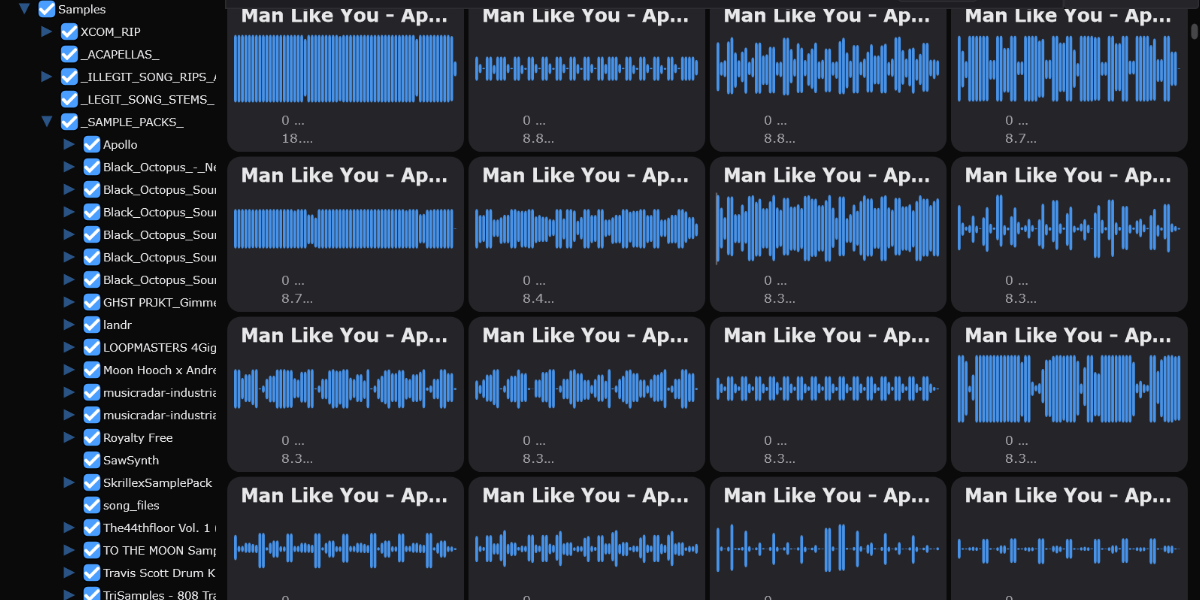
- Waveform View of Files
- Drag and Drop ability
- Tag System
- File sticky notes, easy ways to save a file for later and any ideas had with the file
- Easy audio playback from beginning or from middle of sample by right clicking.
- Color preferences setting, allows changing to whatever you wish!
Music production has hundreds of great tools to allow creators to make new and amazing things, but searching for the right sounding sample when creators have libraries of thousands of files is very difficult in modern softwares like Ableton Live and FL Studio.
File organization is not the only solution for these projects, but properly organizing and labeling samples.
Tags allow users to label each sample with certain traits that they can define. Label a sample with the tags kick, short, trigger and search for multiple tags at once to find the sample for the situation.
Optimized file loading prevents crashes, only loads supported files, and after a first launch it takes only seconds to start up.
Easy drag and drop from Samplify into your preferred DAW, similar to dragging it in from any OS File Explorer.
History & Current Status
Update Nov 25': Were back!
Recently, as Splice has been forcing long term subscriptions to maintain credits and not seeing many other options for exploring samples to the same degree I wanted.
With my recent toolstack gaining this cool thing called Claude, doing major refactors, updating to latest JUCE, renaming properly through the codebase, and doing some slight visual modernizations, this app is back to a modern, dev-ready space.
Pre-Revival History
The purpose of this app has always been one thing, a sample sandbox. A place to 'rapidly' try out new samples and create a sorting system defined by yourself.
The original non-JUCE prototype was created over summer break freshman year. I quickly realized JUCE had a lot of useful featureset right as i was approaching a good MVP over the coming year. The next summer break I started from scratch to develop with JUCE. This was my passion project developed during breaks at Champlain and finished while on my semester in Montreal.
Soon, a smaller company at the time, s:amplify reached out for trademark infringement (rightfully so) and I lost interest in doing a whole refactor.
Soon enough, Splice entered the mainstream producer marketplace. At this point, Samplify was feeling pretty DOA.
Learning Outcomes
- Learned how to read waveforms and draw custom waveforms based off their data
- Learned how to manage memory effectively to reduce UI hanging
- Learned to use JUCE library
- Gained skill in C++ and standard library features included in it
Goal of project was to create a new sample browser for music producers.
The main mechanic that I wanted from a sample browser was a waveform view and a tagging system. The waveform view is working great, with the ability to custom draw the waveform in any way desired, but the loading of this many waveforms slows down the system greatly, especially with large sample libraries.